
The Complete Guide to Secure Data Erasure
Every computer eventually reaches the end of its life.
Some are upgraded.
Some are sold.
Others are recycled, donated, returned after leasing, or decommissioned during hardware refresh projects.
But one thing remains constant:
The data often remains on the drive.
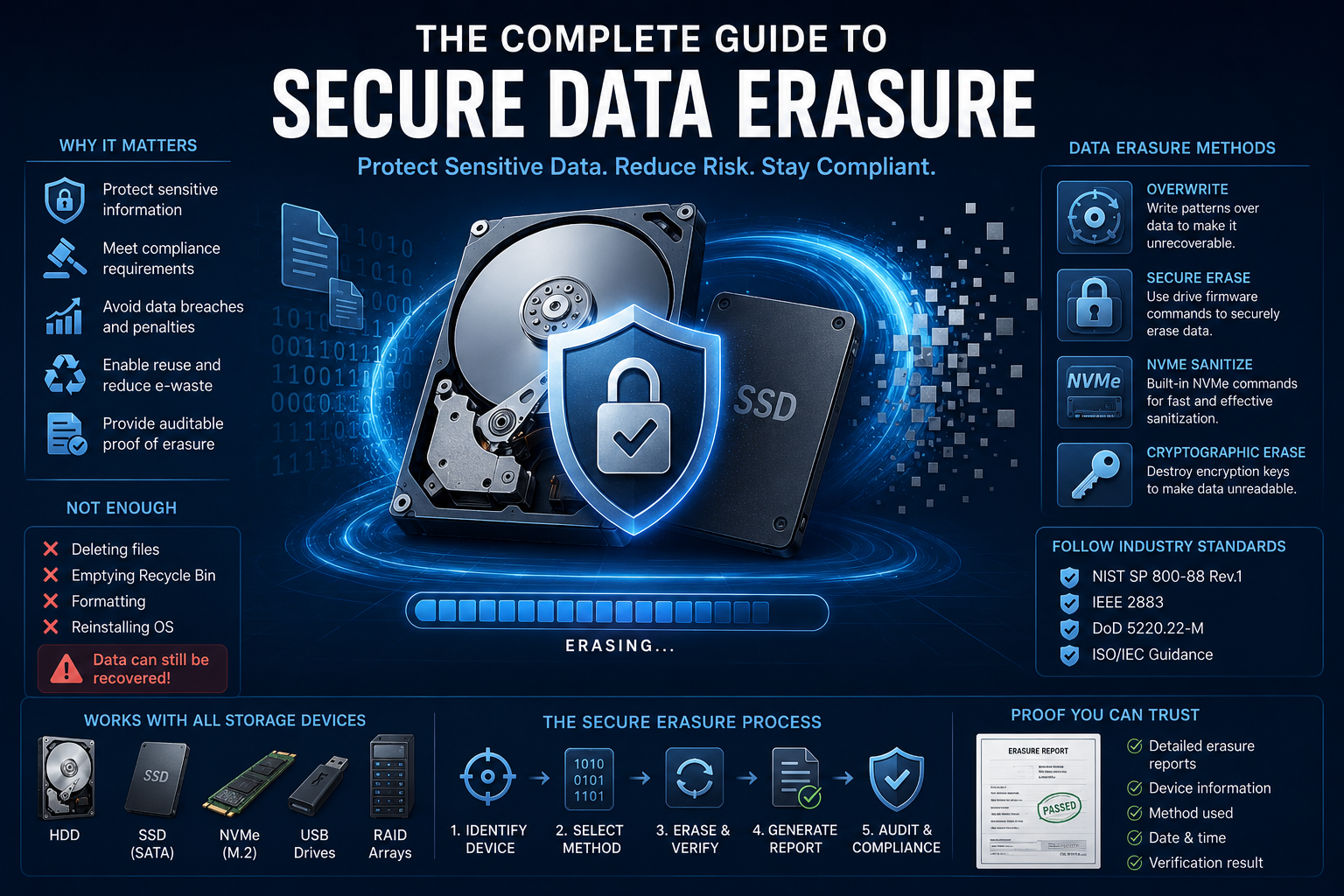
Deleting files, emptying the Recycle Bin, or even formatting a disk rarely removes information permanently.
Without proper sanitization, confidential data may still be recoverable.
This guide explains how secure data erasure works, why it matters, and how modern organizations protect sensitive information throughout the IT asset lifecycle.
What Is Secure Data Erasure?
Secure data erasure—also known as data sanitization—is the process of permanently removing information from a storage device so that it cannot be recovered using commercially available or forensic techniques.
Unlike ordinary deletion, secure erasure intentionally overwrites or sanitizes the storage media using methods appropriate for the device.
The objective is simple:
Once the process is complete, the previous data should no longer be recoverable.
Why Deleting Files Isn't Enough
Many users assume that deleting a file removes it permanently.
In reality, most operating systems simply remove the file's reference from the file system.
The actual contents often remain on the storage device until new data eventually overwrites them.
The same applies to:
- Emptying the Recycle Bin
- Quick formatting
- Deleting partitions
- Reinstalling Windows
Until the underlying storage blocks are properly sanitized, portions of the original data may remain accessible.
Why Secure Data Erasure Matters
Organizations routinely store highly sensitive information, including:
- Customer records
- Financial documents
- Healthcare information
- Intellectual property
- Source code
- Employee records
- Emails
- Password databases
Improper disposal of storage devices can result in:
- Data breaches
- Regulatory penalties
- Identity theft
- Reputational damage
- Financial losses
Secure erasure reduces these risks before equipment leaves organizational control.
Common Situations Requiring Data Erasure
Secure sanitization should be considered whenever storage devices are:
- Sold
- Donboarded to employees
- Returned after leasing
- Donated
- Recycled
- Reassigned internally
- Retired from data centers
- Sent for warranty replacement
Many organizations also sanitize drives before redeploying them within the company.
Secure Data Erasure vs Physical Destruction
There are two primary approaches to retiring storage devices.
Secure Data Erasure
The storage device remains usable.
Advantages:
- Reuse hardware
- Resell equipment
- Lower environmental impact
- Lower replacement costs
- Audit documentation
Physical Destruction
The storage device is permanently destroyed.
Advantages:
- Appropriate for damaged media
- Suitable when sanitization cannot be verified
Disadvantages:
- Hardware cannot be reused
- Generates electronic waste
- Higher replacement costs
Modern organizations increasingly choose secure erasure whenever practical.
Common Data Sanitization Methods
Several techniques are used depending on the storage technology.
Overwriting
New data is written over existing sectors.
Traditionally used for hard disk drives (HDDs).
Firmware Secure Erase
Many SSDs and HDDs support manufacturer-provided erase commands that internally sanitize the device.
These commands are generally faster than repeated overwriting.
NVMe Sanitize
Modern NVMe SSDs often support specialized sanitize operations designed specifically for flash storage.
Cryptographic Erase
Self-encrypting drives (SEDs) may destroy the encryption keys protecting stored data.
Without the encryption keys, previously stored information becomes unreadable.
HDD vs SSD: Why They Are Different
Hard drives and solid-state drives require different approaches.
HDD
Traditional magnetic drives respond well to verified overwrite operations.
A properly completed overwrite generally provides effective sanitization.
SSD
Flash storage behaves differently because of:
- Wear leveling
- Overprovisioning
- Controller-managed block allocation
- Hidden spare blocks
As a result, repeated overwriting may not reach every physical memory cell.
Modern SSD workflows often rely on firmware Secure Erase or NVMe Sanitize commands instead.
Modern Data Sanitization Standards
Rather than focusing on overwrite counts alone, today's standards emphasize selecting the correct method for each storage technology.
Common references include:
- NIST SP 800-88 Rev.1
- IEEE 2883
- ISO security frameworks
- Organizational security policies
Modern guidance generally focuses on:
- Appropriate sanitization methods
- Verification
- Media type
- Documentation
- Risk assessment
The question is no longer:
"How many overwrite passes?"
Instead, it becomes:
"Was the correct sanitization method successfully completed?"
Verification Is Critical
Successful erasure is not simply about starting the process.
Organizations should verify:
- The operation completed successfully
- No errors occurred
- Target devices were correctly identified
- Reports were generated
- Audit records were preserved
Verification is often more valuable than increasing overwrite counts.
Certificates and Audit Trails
Enterprise environments frequently require proof that sanitization occurred.
Typical reports include:
- Device serial number
- Model
- Capacity
- Sanitization method
- Operator
- Date and time
- Verification status
- Final result
These records support:
- Internal audits
- Compliance reviews
- Customer requirements
- Asset disposition documentation
Solutions such as Active@ KillDisk automatically generate detailed erasure reports and certificates, simplifying documentation for enterprise environments.
Common Myths About Data Erasure
Myth 1: Formatting Deletes Everything
Formatting usually removes file system structures—not the underlying data.
Myth 2: More Overwrite Passes Are Always Better
Modern standards generally prioritize verification and media-appropriate methods over excessive overwrite counts.
Myth 3: SSDs Should Always Be Overwritten Repeatedly
Firmware Secure Erase or NVMe Sanitize commands are often more appropriate for flash storage.
Myth 4: Physical Destruction Is Always Necessary
Many organizations securely erase and redeploy hardware, reducing both costs and electronic waste.
Choosing Data Erasure Software
When selecting a secure erasure solution, look for features such as:
- Support for HDDs, SSDs, and NVMe drives
- Multiple sanitization standards
- Secure Erase support
- Verification
- Detailed reporting
- Automation
- Bootable environments
- Network deployment
- Audit logs
For organizations managing multiple storage devices, solutions like Active@ KillDisk provide centralized workflows, standards-based sanitization methods, automated verification, and detailed reporting designed for enterprise data disposal projects.
Best Practices
Successful data sanitization involves more than simply running an erase command.
Recommended practices include:
✔ Identify the storage technology.
✔ Select the appropriate sanitization method.
✔ Verify successful completion.
✔ Preserve audit reports.
✔ Physically destroy drives that cannot be sanitized.
✔ Train personnel in disposal procedures.
✔ Integrate erasure into the organization's IT asset lifecycle.
Frequently Asked Questions
Is deleting files enough?
No.
Deleted files often remain recoverable until the storage media is properly sanitized.
Can SSDs be securely erased?
Yes.
Modern SSDs support secure sanitization methods specifically designed for flash memory, including Secure Erase and NVMe Sanitize.
Is physical destruction always required?
Not necessarily.
Many organizations securely erase drives and safely reuse or resell them.
Physical destruction is generally reserved for damaged or non-functional media that cannot be reliably sanitized.
How many overwrite passes are recommended?
Modern guidance focuses on selecting the correct sanitization method rather than maximizing overwrite counts.
For many modern HDDs, a verified overwrite is sufficient.
For SSDs, firmware-based sanitization is often preferred.
Final Thoughts
Secure data erasure is no longer simply about deleting files or running multiple overwrite passes.
Modern storage technologies require media-specific sanitization methods, careful verification, and thorough documentation.
Organizations that combine appropriate erase techniques with audit-ready reporting can safely retire, redeploy, or resell storage devices while reducing security risks and maintaining regulatory compliance.
As storage technology continues to evolve, effective data sanitization depends less on tradition and more on using the right method for the right device—and proving the process was completed successfully.